 安卿辰博客
安卿辰博客本文由 安卿辰博客 编辑整理发布,内容来源于互联网公开资料。如需转载或引用,请注明出处。
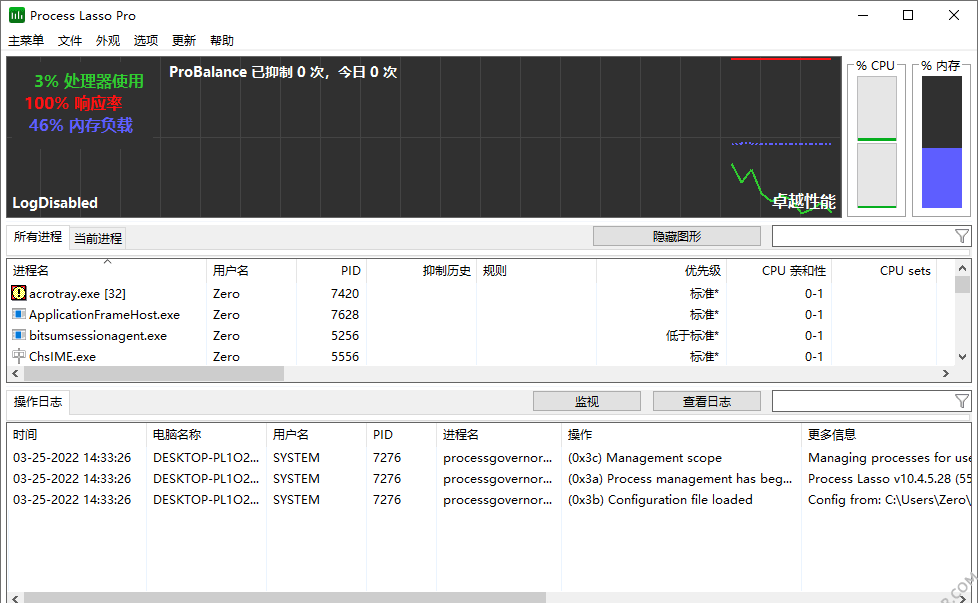
Process Lasso 便携版是一款面向 Windows 平台的高级系统优化工具,通过智能 CPU 资源分配与自动化任务调度,显著提升系统运行效率。其核心 ProBalance 技术能够动态调整进程优先级,有效避免因资源过度占用导致的系统响应迟缓或崩溃。此外,该工具支持用户自定义进程管理规则,以优化各类应用程序的执行性能,尤其适用于游戏玩家、内容创作者及其他对系统性能有较高要求的用户。
官方网站:bitsum.com
截屏
功能摘要
- 智能调整进程优先级,防止系统因过度使用 CPU 而变得无响应。
-
- 自定义规则和限制,实现进程优先级的自动化管理。
-
- 为特定应用程序设置永久的 CPU 限制和优先级分配,确保稳定的系统性能。
- 针对多核 CPU 进行负载分配,最大化硬件利用率,提升多任务处理性能。
-
- 提供详细的系统性能和进程监控,帮助用户及时发现性能瓶颈。
-
- 针对游戏或资源密集型应用优化系统资源分配,确保更流畅的体验。
-
- 根据用户活动自动切换不同电源模式,优化性能和节能。
-
- 可以阻止某些进程启动或设置自动终止策略,提升系统安全性与性能。
-
- Process Lasso 的核心引擎独立于界面运行,确保即使主界面关闭,优化功能依旧生效。
-
- 记录进程活动与性能数据,帮助用户分析和优化系统表现。
更新日志
https://bitsum.com/changes/processlasso/ 页面列出了 Process Lasso 各版本的更新记录。该工具主要用于实时优化进程调度与系统资源管理,通过动态调整 CPU 优先级与处理器亲和性来提升系统响应速度与稳定性。其核心功能包括进程优先级自动管理、ProBalance 智能均衡算法、电源方案自动切换,以及针对特定进程的性能限制或保障机制。此外,它还提供了日志记录、规则配置与命令行接口,适用于需要精细控制后台进程行为的用户场景。
(1) 图形用户界面:在诊断报告中新增了额外的GPU枚举信息。
(1) GUI: Resolved a problem on certain multi-GPU systems where a phantom iGPU adapter might be displayed.
(3) Core: Resolved a problem where Foreground Boosting was activated while the promoted priority class was configured as “none”.
(9) 图形用户界面:针对每个进程的GPU使用率采集进行了多项优化
(1) GUI: Resolved a problem on certain multi-GPU systems where a phantom iGPU adapter might be displayed.
(3) Core: Resolved a problem where Foreground Boosting was activated while the promoted priority class was configured as “none”.
(9) 图形用户界面:针对每个进程的GPU使用率采集进行了多项优化
(1) 安装程序:移除余下的不完整翻译警告
(1) 翻译:增强一致性检查工具
(1) GUI: Corrected Finnish translation
(3) GUI: 将最近50条日志条目添加至诊断报告中。
(3) GUI: 对GPU适配器的去重逻辑进行了优化。
(5) GUI: Adjust GPU adapter numbering to start from 0
(1) 翻译:增强一致性检查工具
(1) GUI: Corrected Finnish translation
(3) GUI: 将最近50条日志条目添加至诊断报告中。
(3) GUI: 对GPU适配器的去重逻辑进行了优化。
(5) GUI: Adjust GPU adapter numbering to start from 0
于2026年5月22日
添加基于负载的电源配置文件切换器。
微小的修复与功能增强。
(1) GUI: 新增基于负载的电源配置自动切换功能。
(11) 图形用户界面:将每个进程的多GPU读取信息扩展至活跃进程视图。
(11) GUI: On the line graph displaying multiple GPUs, the GPU widgets now adopt the same colors as the corresponding GPU lines.
(13) GUI: When displaying multiple GPU instances, include their numbers in the line graph legend.
(13) GUI: 修复了日语版RAM加载状态条分区的一个问题。
(15) GUI: Enhanced rendering of widget captions when using larger text sizes
(15) GUI: Resolved a problem where duplicate entries for multiple identical GPUs could occasionally be removed during deduplication.
(15) GUI: 在帮助菜单和“关于”对话框中新增诊断数据收集工具。
(17) GUI: 修复了芬兰语翻译中导致图形界面无法打开的问题。
(17) GUI: 优化 CPU 与 GPU 组件图表中工具提示的交互行为
(17) 图形用户界面:为RAM组件添加工具提示
(19) GUI: Generate distinct action strings to accommodate variations in verb-subject ordering across languages
(19) GUI: 在操作确认提示框(如终止进程)中列出具体的进程信息。
(21) GUI: 强化翻译验证相关的工具支持
(21) 图形用户界面:修复了CPU平均列排序中的一个问题。
(23) GUI: 新增HKCU注册表项,用于覆盖GPU小组件颜色设置“gpuColor1”、“gpuColor2”等。
(23) GUI: Modify the character content of the GPU preference rule string.
(25) GUI: 为当前 GPU 适配器添加自定义颜色选择菜单项
(27) GUI: 当重置自定义颜色后,不再将主题切换为自定义模式。
(29) GUI: If the adapter name suffix is identical, it is now omitted from GPU preferences.
(29) GUI: 优化了在配备同级别 GPU 的系统上,GPU 偏好适配器名称的显示行为。
(33) GUI: 动态调整“显示/隐藏图表”与“编辑规则”按钮的尺寸
(41) 图形界面:新增“视图”选项,用于管理每个进程的GPU数据收集方式(自动、全部、仅可见行)
(43) GUI: Modified the aggregate total calculation method for GPU utilization to address specific edge cases.
(49) GUI: 动态调整“查看日志”与“洞察”按钮的尺寸
(49) GUI: Enhanced button padding when the system font size is increased.
(49) 图形用户界面:翻译更新
添加基于负载的电源配置文件切换器。
微小的修复与功能增强。
(1) GUI: 新增基于负载的电源配置自动切换功能。
(11) 图形用户界面:将每个进程的多GPU读取信息扩展至活跃进程视图。
(11) GUI: On the line graph displaying multiple GPUs, the GPU widgets now adopt the same colors as the corresponding GPU lines.
(13) GUI: When displaying multiple GPU instances, include their numbers in the line graph legend.
(13) GUI: 修复了日语版RAM加载状态条分区的一个问题。
(15) GUI: Enhanced rendering of widget captions when using larger text sizes
(15) GUI: Resolved a problem where duplicate entries for multiple identical GPUs could occasionally be removed during deduplication.
(15) GUI: 在帮助菜单和“关于”对话框中新增诊断数据收集工具。
(17) GUI: 修复了芬兰语翻译中导致图形界面无法打开的问题。
(17) GUI: 优化 CPU 与 GPU 组件图表中工具提示的交互行为
(17) 图形用户界面:为RAM组件添加工具提示
(19) GUI: Generate distinct action strings to accommodate variations in verb-subject ordering across languages
(19) GUI: 在操作确认提示框(如终止进程)中列出具体的进程信息。
(21) GUI: 强化翻译验证相关的工具支持
(21) 图形用户界面:修复了CPU平均列排序中的一个问题。
(23) GUI: 新增HKCU注册表项,用于覆盖GPU小组件颜色设置“gpuColor1”、“gpuColor2”等。
(23) GUI: Modify the character content of the GPU preference rule string.
(25) GUI: 为当前 GPU 适配器添加自定义颜色选择菜单项
(27) GUI: 当重置自定义颜色后,不再将主题切换为自定义模式。
(29) GUI: If the adapter name suffix is identical, it is now omitted from GPU preferences.
(29) GUI: 优化了在配备同级别 GPU 的系统上,GPU 偏好适配器名称的显示行为。
(33) GUI: 动态调整“显示/隐藏图表”与“编辑规则”按钮的尺寸
(41) 图形界面:新增“视图”选项,用于管理每个进程的GPU数据收集方式(自动、全部、仅可见行)
(43) GUI: Modified the aggregate total calculation method for GPU utilization to address specific edge cases.
(49) GUI: 动态调整“查看日志”与“洞察”按钮的尺寸
(49) GUI: Enhanced button padding when the system font size is increased.
(49) 图形用户界面:翻译更新
2026年5月5日
添加GPU偏好规则。
为多个GPU添加显示支持
进行了小幅修复与功能增强。
(1) 图形用户界面:为GPU组件和折线图新增多GPU支持。
(3) GUI: 新增 GPU 优先级规则
(3) GUI: Added a toggle to switch the line graph display between consolidated and individual GPU data.
(3) GUI: 在状态栏和工具提示中增加对多GPU的支持
(5) GUI: Under certain circumstances, the borders displayed around CPU core graphs have been removed.
(15) GUI: 调整日志子菜单的排序方式
(19) GUI: 在进程列表中新增对多GPU的支持
(21) GUI:为“活动进程阈值”滑块添加工具提示,以显示当前数值。
(23) GUI/Core: Enhanced Regular Expression support has been extended to Instance Count Limit rules.
(31) GUI: 为折线图添加包含相关视图设置的上下文菜单
(33) 图形用户界面:翻译更新
添加GPU偏好规则。
为多个GPU添加显示支持
进行了小幅修复与功能增强。
(1) 图形用户界面:为GPU组件和折线图新增多GPU支持。
(3) GUI: 新增 GPU 优先级规则
(3) GUI: Added a toggle to switch the line graph display between consolidated and individual GPU data.
(3) GUI: 在状态栏和工具提示中增加对多GPU的支持
(5) GUI: Under certain circumstances, the borders displayed around CPU core graphs have been removed.
(15) GUI: 调整日志子菜单的排序方式
(19) GUI: 在进程列表中新增对多GPU的支持
(21) GUI:为“活动进程阈值”滑块添加工具提示,以显示当前数值。
(23) GUI/Core: Enhanced Regular Expression support has been extended to Instance Count Limit rules.
(31) GUI: 为折线图添加包含相关视图设置的上下文菜单
(33) 图形用户界面:翻译更新
2026年4月15日
小幅修复与功能改进
(5) 图形用户界面:对“暂停”按钮进行翻译。
(7) GUI: 在 GPU 利用率组件中添加右键菜单,以便通过便捷方式将其禁用。
(7) GUI: 当GPU数据采集关闭时,在GPU进程列中显示一个连字符。
(7) GUI: 进行了小幅优化
(9) 构建:扩展构建后的性能分析功能
(9) GUI: Introduce user-defined color selection for GPU utilization.
(13) GUI: Decrease GPU usage when rendering CPU core graphs.
(15) GUI/Core: Modify RegEx caching to enable deferred attribution of process metadata.
(17) ThreadRacer: 使用星号标记AMD芯片标示的最快核心。
(19) ThreadRacer: 将部分字符串迁移至资源文件中
(21) 图形用户界面:更新了翻译内容
(23) GUI: Adjust the pause button size dynamically to accommodate longer languages
小幅修复与功能改进
(5) 图形用户界面:对“暂停”按钮进行翻译。
(7) GUI: 在 GPU 利用率组件中添加右键菜单,以便通过便捷方式将其禁用。
(7) GUI: 当GPU数据采集关闭时,在GPU进程列中显示一个连字符。
(7) GUI: 进行了小幅优化
(9) 构建:扩展构建后的性能分析功能
(9) GUI: Introduce user-defined color selection for GPU utilization.
(13) GUI: Decrease GPU usage when rendering CPU core graphs.
(15) GUI/Core: Modify RegEx caching to enable deferred attribution of process metadata.
(17) ThreadRacer: 使用星号标记AMD芯片标示的最快核心。
(19) ThreadRacer: 将部分字符串迁移至资源文件中
(21) 图形用户界面:更新了翻译内容
(23) GUI: Adjust the pause button size dynamically to accommodate longer languages
模组信息
- 采用魔法硬编码机制,无需进行注册即可使用;
下载地址
免责声明:本文内容整理自公开资料,仅供学习和参考。软件版权归原作者或公司所有。如有侵犯您的权益,请及时与我们联系,我们将及时处理。